
A key part of JSTOR’s mission to expand access to knowledge for everyone is ensuring that knowledge is accessible to everyone. This is why we don’t just view accessibility as a box to check, but an integral part of everything we do, and something we constantly strive to improve. This page shares our principles and process, and provides a central spot for updates and resources regarding our accessibility efforts.
JSTOR’s commitment to accessibility
At JSTOR, we believe accessibility is fundamental to access. We are committed to designing and improving our platform so that scholarship can be discovered, read, and used by everyone. We honor this commitment by:
- Embedding accessibility into our nonprofit mission through a formal, platform-wide strategy that guides how our products are designed, built, and evaluated
- Meeting—and working to exceed—current accessibility standards, and regularly documenting how our platform aligns with those standards
- Making new and existing scholarship more discoverable and usable for a wider range of people
- Having a dedicated accessibility expert on staff to train and consult with content, product, engineering, and support teams as well as interface directly with end users as needed
- Working with contributors of content to JSTOR to support accessible content creation at the point of authorship, recognizing that accessibility is a shared responsibility and that content is often distributed across multiple platforms
- Using regularly scheduled automated checks and manual audits to evaluate and measure the accessibility of the site
- Providing clear, transparent accessibility statements that are externally reviewed for completeness and clarity, as indicated by our 100% ASPIRE rating
Accessibility standards & conformance reporting
- The latest JSTOR Accessibility Conformance Report (ACR) (PDF) and JSTOR Digital Stewardship ACR demonstrate the extent of compliance with both Section 508 and WCAG standards and guidelines based on the Voluntary Product Accessibility Template (VPAT).
- The Web Content Accessibility Guidelines (WCAG) define requirements for designers and developers to improve accessibility for persons with disabilities at three levels of conformance: Level A, Level AA, and Level AAA. The target for JSTOR is WCAG 2.2 Level AA.
User support and accommodations
JSTOR is designed to work with a range of ways people read, navigate, and interact with content—including keyboard navigation, screen readers, and text-to-speech tools. In addition to built-in support across the platform, we offer ways to request additional help when needed.
On-demand content remediation
For some content—particularly older PDFs featuring digital or print scans created before modern accessibility standards—an accessible version may not already be available.
This is why we’re building tools, launching in April 2026, that will add tagging and other features to increase the accessibility of PDFs and images.
These enhancements will allow users to request an accessible version of the content, including image descriptions. Requests trigger an on-demand remediation process that quickly produces a version designed to work with current assistive technologies.
Using JSTOR with different tools and settings
JSTOR supports multiple ways of accessing content so users can interact with the platform in ways that work best for them. Measures are in place to ensure users can:
- Adjust how content is displayed, including resizing text, adjusting text spacing, and changing fonts using browser or device settings (for example, appearance settings in Chrome or Firefox).
- View content with sufficient color contrast across the site. Colors can be adjusted using browser settings or extensions, such as font and color preferences in Firefox or tools like Change Colors in Chrome.
- Navigate the site using a keyboard, with full access to interactive elements.
- Skip directly to main content and bypass repeated or long lists of links.
- Zoom content up to 200%, with text reflowing to prevent loss of information or functionality.
- Use the site in different orientations, including both landscape and portrait layouts, with responsive design.
- Access the site with screen-reading technologies, such as NVDA, VoiceOver, or JAWS.
- Understand page structure and reading order, supported by clear heading hierarchy and logical content flow.
- Use text-to-speech tools, both within the platform and with PDF content, including browser extensions and built-in device features.
- Access alternative text for interface images, including any provided descriptions in Community Collections.
- Understand link destinations, with link text that clearly describes where links lead without requiring surrounding context.
For more detailed information about supported technologies and accessibility features, see Support for Content Accessibility on our support site.
News and updates
Read the latest accessibility updates.
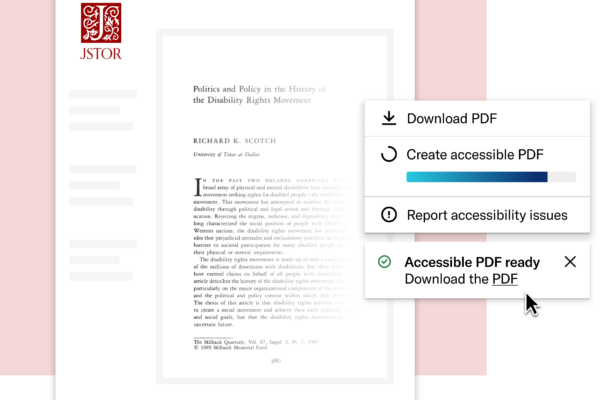
Improving accessibility on JSTOR: what libraries and users can expect
With upcoming ADA Title II requirements taking effect in April 2026, institutions are closely evaluating how well their digital resources support access for everyone. At JSTOR, accessibility is an ongoing commitment, supported by new on-demand remediation tools to help ensure users can access the content they need, when they need it.
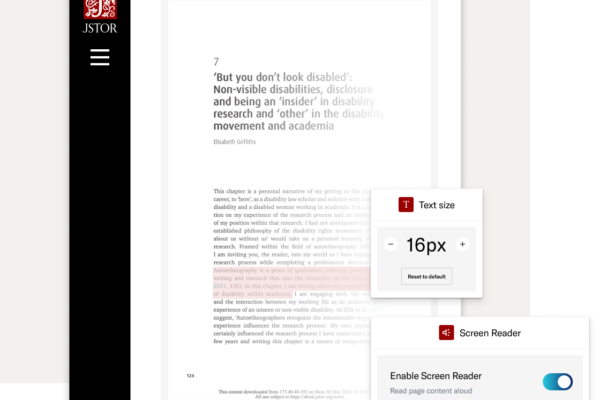
What we’re hearing from accessibility leaders across higher education
Ahead of updated ADA Title II requirements, we spoke with accessibility leaders at seven public universities about what sustainable progress really looks like. Their focus: prioritization, transparency from providers, and scalable, human-centered solutions that build accessibility into systems.

A digital collections platform that’s accessible by design: How JSTOR Stewardship removes workflow barriers today
With updated ADA Title II requirements approaching, JSTOR is advancing accessibility across both its research platform and the tools stewards use to manage collections. Launched in April 2025, JSTOR Stewardship was built to align with current accessibility standards from the ground up.
Contact us
We have a single point of contact on our platform, which helps us to increase speed and turnaround time with support requests from all our users. Accessibility tickets are prioritized in this system and put to the top of our workflow.
Please contact us if you need content in an alternative format, find an accessibility issue with the website, or need general assistance. You can do this via phone, chat, or email.
Phone: (888) 388-3574
Email: support@jstor.org
Chat: JSTOR Support homepage
Hours: Monday-Friday, 8:30 AM-5:00 PM EDT
For more information about accessible content on JSTOR, including how to report issues with OCR or PDF tagging, please see our Support for Content Accessibility page.
Last updated February 6, 2026